Dictionary Kullanımı 
using System;
using System.Collections.Generic;
using System.ComponentModel;
using System.Data;
using System.Drawing;
using System.Linq;
using System.Text;
using System.Threading.Tasks;
using System.Windows.Forms;

namespace dictionary_kullanımı
{
    public partial class Form1 : Form
    {
        public Form1()
        {
            InitializeComponent();
        }
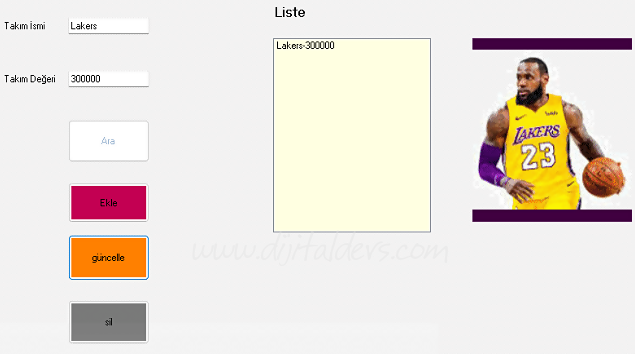
        Dictionary<int, string> ghaith = new Dictionary<int, string>();
        int kasas;
        string deger;

        private void button2_Click(object sender, EventArgs e)
        {
            try
            {
                kasas = int.Parse(textBox1.Text);
                deger = textBox2.Text;
                ghaith.Add(kasas, deger);
                TakimBul();
            }
            catch
            {
                if(textBox2.Text == "" || textBox1.Text =="")
                {
                    MessageBox.Show("bir şeyi eksik veya boş girdiniz");
                }
                else
                {
                    MessageBox.Show("Zaten Eklemişsin");
                }
            }
        }
        private void TakimBul()
        {
            listBox1.Items.Clear();
            foreach (var ogrenci in ghaith)
            {
                listBox1.Items.Add(ogrenci.Value + "-" + ogrenci.Key);
            }
        }

        private void button3_Click(object sender, EventArgs e)
        {
            kasas = int.Parse(textBox1.Text);
            deger = textBox2.Text;
            ghaith[kasas]=deger;
            TakimBul();
        }

        private void button4_Click(object sender, EventArgs e)
        {
            kasas =int.Parse(textBox1.Text);
            ghaith.Remove(kasas);
            TakimBul();
        }

        private void button1_Click(object sender, EventArgs e)
        {
            bool durum = false;
            if (textBox2.Text !="")
            {
                deger = textBox2.Text;
                durum = ghaith.ContainsValue(deger);
            }
             else
            {
                deger = textBox2.Text;
                durum = ghaith.ContainsKey(kasas);
            }
            if (durum == true)
            {
                MessageBox.Show("Takım burda .");
            }
            else
            {
                MessageBox.Show("Takım bulunamadı(yok).");
            }
        }
    }
}